
v1.5.0 — Webhooks, Saved configurations and Signal History that finally makes sense
Send TradingView alerts straight to your broker, save a workspace configuration and reuse it anywhere, and read Signal History one signal at a time.
Available on all plans. One thing worth checking: if you had Move SL After X enabled with a value of 0, that feature was never firing. Open the workspace, set a value above 0, and save. Every other existing setup is unaffected.
- Added
TradingView → Your broker, via webhook
Details (opens in new tab)Send alerts from TradingView straight to your broker account. Any app or indicator that can send a pair, direction, SL and TP works too — and every trade2sync feature applies to those trades exactly as it does to Telegram signals. Works with MT4, MT5, cTrader, DXtrade and TradeLocker.
- Added
Save, reuse and move your configurations
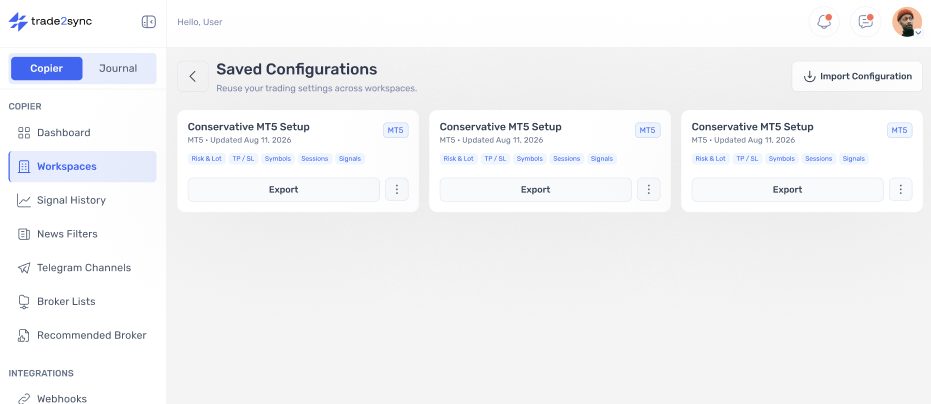
Tuning a workspace takes time, and until now that work was locked to one workspace. Save any configuration — risk & lot, TP/SL, symbols, signal settings — and apply it anywhere: copy it to another workspace, export it as a file to back up or share, or import one you saved earlier. All saved configurations live in one place.
- Added
Swap broker
Point an existing workspace at a different broker account without rebuilding its settings or reconnecting its channels.
- Added
Signal History — one signal, one row
A three-target signal used to produce three rows, leaving you to piece together what actually happened. History now groups by signal: one row showing pair, direction and targets hit. Open it for each TP with its lot, fill price, broker ID and comment, plus a step-by-step timeline — order sent, filled, stop moved to breakeven, target hit.
- Added
Signal analytics at a glance
Signal History now opens with a summary: signals received, fully executed, rejected by your broker, and filtered by your own rules. The split tells you where to look — a broker rejection points at margin, spread or market hours; a rule rejection means your configuration did its job, or blocked something you meant to take.
- Improved
Pending order expiry from 1 minute
The minimum drops from 10 minutes to 1. Tighter control on fast-moving pairs, where an untriggered limit or stop order can be cleaned up in a minute instead of sitting on your account.
- Added
Signals with custom emoji are now read
Some providers style signals using Telegram's premium emoji — the symbol, direction or tags rendered as coloured badges instead of plain text. The copier couldn't see the text inside them, so those signals were skipped without warning. It now reads the text behind custom emoji, so a badged
XAUUSDorSELLparses and executes like any other. Applies automatically to all your channels, no setup needed. - Improved
Replies to image signals now update your trades
When a provider posts a signal as an image, the copier opens the trades — but a follow-up text reply like "close half" or "move to BE" had nowhere to go. Replies are now matched to the trades that image opened. Close, partial close, breakeven, SL and TP changes all work the same as on text signals.
- Fixed
Move SL After X no longer accepts 0Breaking
Move SL After X (Pips / RR / Money / TP Hit) previously accepted
0as a value. Set that way the feature had no trigger point and silently did nothing — the toggle looked on, but your stop never moved. The field now requires a value above 0, so an enabled feature actually runs.If you had Move SL After X enabled with 0, that feature was never firing. Open the workspace, set a value above 0, and save.